PopupMenuButton
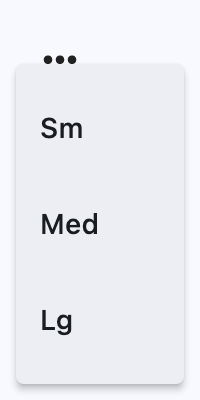
An icon button which displays a menu when clicked.
ft.PopupMenuButton(
    items=[
        ft.PopupMenuItem(content="Sm"),
        ft.PopupMenuItem(content="Med"),
        ft.PopupMenuItem(content="Lg"),
    ],
    menu_position=ft.PopupMenuPosition.UNDER,
)
Inherits: LayoutControl
Properties
bgcolor- The menu's background color.clip_behavior- Thecontentwill be clipped (or not) according to this option.content- AControlthat will be displayed instead of "more" icon.elevation- The menu's elevation when opened.enable_feedback- Whether detected gestures should provide acoustic and/or haptic feedback.icon- If provided, an icon to draw on the button.icon_color- Theicon's color.icon_size- Theicon's size.items- A collection ofPopupMenuItemcontrols to display in a dropdown menu.menu_padding- The padding around the menu's contents.menu_position- Defines position of the popup menu relative to the button.padding- The padding around the button's tappable area.popup_animation_style- The animation style used when the popup menu opens and closes.shadow_color- The color used to paint the shadow below the menu.shape- The menu's shape.size_constraints- Size constraints applied to the popup menu.splash_radius- The splash radius.style- The button style used for the popup menu button itself.
Events
Examples
PopupMenuButton
import flet as ft


def main(page: ft.Page):
    def handle_check_item_click(e: ft.Event[ft.PopupMenuItem]):
        e.control.checked = not e.control.checked

    page.add(
        ft.SafeArea(
            content=ft.PopupMenuButton(
                key="popup",
                items=[
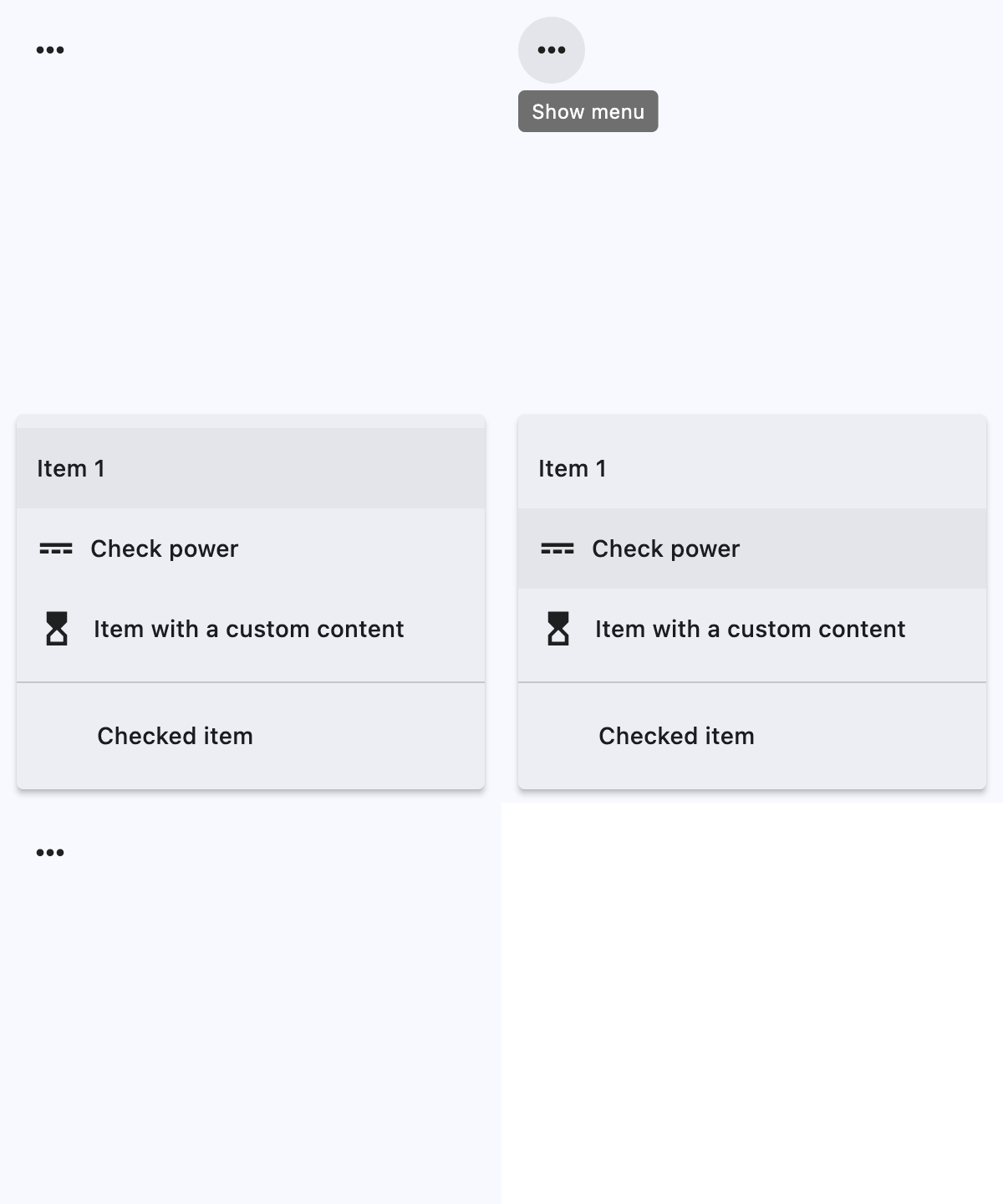
                    ft.PopupMenuItem(content="Item 1"),
                    ft.PopupMenuItem(icon=ft.Icons.POWER_INPUT, content="Check power"),
                    ft.PopupMenuItem(
                        content=ft.Row(
                            controls=[
                                ft.Icon(ft.Icons.HOURGLASS_TOP_OUTLINED),
                                ft.Text("Item with a custom content"),
                            ]
                        ),
                        on_click=lambda _: print("Button with custom content clicked!"),
                    ),
                    ft.PopupMenuItem(),  # divider
                    ft.PopupMenuItem(
                        content="Checked item",
                        checked=False,
                        on_click=handle_check_item_click,
                    ),
                ],
            )
        )
    )


if __name__ == "__main__":
    ft.run(main)
Properties
bgcolorclass-attributeinstance-attribute
bgcolor: ColorValue | None = NoneThe menu's background color.
clip_behaviorclass-attributeinstance-attribute
clip_behavior: ClipBehavior = ClipBehavior.NONEThe content will be clipped (or not) according to this option.
contentclass-attributeinstance-attribute
content: StrOrControl | None = NoneA Control that will be displayed instead of "more" icon.
elevationclass-attributeinstance-attribute
elevation: Number | None = NoneThe menu's elevation when opened.
Defaults to 8.
enable_feedbackclass-attributeinstance-attribute
enable_feedback: bool | None = NoneWhether detected gestures should provide acoustic and/or haptic feedback.
On Android, for example, setting this to True produce a click sound and a
long-press will produce a short vibration.
Defaults to True.
iconclass-attributeinstance-attribute
icon: IconDataOrControl | None = NoneIf provided, an icon to draw on the button.
itemsclass-attributeinstance-attribute
items: list[PopupMenuItem] = field(default_factory=list)A collection of PopupMenuItem controls to display in a dropdown menu.
menu_paddingclass-attributeinstance-attribute
menu_padding: PaddingValue | None = NoneThe padding around the menu's contents.
Use this to inset the list of popup menu entries from the menu's outer boundary.
menu_positionclass-attributeinstance-attribute
menu_position: PopupMenuPosition | None = NoneDefines position of the popup menu relative to the button.
Defaults to PopupMenuPosition.OVER.
paddingclass-attributeinstance-attribute
padding: PaddingValue = 8The padding around the button's tappable area.
This affects the button itself, not the spacing inside the popup menu.
popup_animation_styleclass-attributeinstance-attribute
popup_animation_style: AnimationStyle | None = NoneThe animation style used when the popup menu opens and closes.
Use this to customize the menu's motion timing, curves, and related animation behavior.
shadow_colorclass-attributeinstance-attribute
shadow_color: ColorValue | None = NoneThe color used to paint the shadow below the menu.
shapeclass-attributeinstance-attribute
shape: OutlinedBorder | None = NoneThe menu's shape.
Defaults to CircleBorder(radius=10.0).
size_constraintsclass-attributeinstance-attribute
size_constraints: BoxConstraints | None = NoneSize constraints applied to the popup menu.
Use this to control the minimum and maximum size of the menu when it is shown.
splash_radiusclass-attributeinstance-attribute
splash_radius: Number | None = NoneThe splash radius.
styleclass-attributeinstance-attribute
style: ButtonStyle | None = NoneThe button style used for the popup menu button itself.
This customizes the appearance and interactive states of the anchor button, not the popup menu entries.
Events
on_cancelclass-attributeinstance-attribute
on_cancel: ControlEventHandler[PopupMenuButton] | None = (
    None
)
Called when the user dismisses/cancels the popup menu without selecting an item.
on_openclass-attributeinstance-attribute
on_open: ControlEventHandler[PopupMenuButton] | None = NoneCalled when the popup menu is shown.
on_selectclass-attributeinstance-attribute
on_select: ControlEventHandler[PopupMenuButton] | None = (
    None
)
Called when the user selects a popup menu item.
The Event.data property of the event handler argument contains the
selected PopupMenuItem control's ID as a string.
A popup menu item.
Inherits: Control
Properties
checked- Whether this menu item is checked.content- AControlrepresenting custom content of this menu item.height- The minimum height of this menu item.icon- An icon to draw before the text label of this menu item.label_text_style- The text style of the label of this menu item.mouse_cursor- The cursor to be displayed when a mouse pointer enters or is hovering over this item.padding- The padding of this menu item.
Events
on_click- Called when a user clicks on this menu item.
Properties
checkedclass-attributeinstance-attribute
checked: bool | None = NoneWhether this menu item is checked.
If set to True, a checkmark will be shown on the left of the
content.
contentclass-attributeinstance-attribute
content: StrOrControl | None = NoneA Control representing custom content of this menu item.
iconclass-attributeinstance-attribute
icon: IconDataOrControl | None = NoneAn icon to draw before the text label of this menu item.
label_text_styleclass-attributeinstance-attribute
label_text_style: TextStyle | None = NoneThe text style of the label of this menu item.
mouse_cursorclass-attributeinstance-attribute
mouse_cursor: MouseCursor | None = NoneThe cursor to be displayed when a mouse pointer enters or is hovering over this item.
paddingclass-attributeinstance-attribute
padding: PaddingValue | None = NoneThe padding of this menu item.
Defaults to Padding.symmetric(horizontal=12).
Events
on_clickclass-attributeinstance-attribute
on_click: ControlEventHandler[PopupMenuItem] | None = NoneCalled when a user clicks on this menu item.